Posts

Showing posts with the label myTutorials

Alembic Cache Export and Import in May

Image
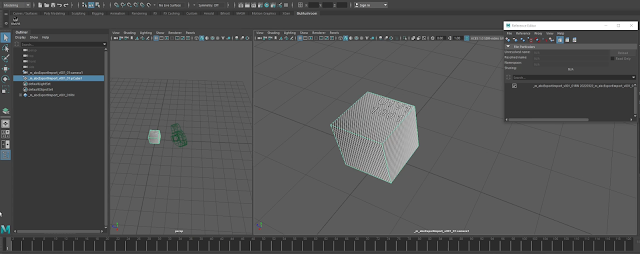
Alembic Cache Export and Import in Maya from Patrick Woo on Vimeo . Watch this on YouTube. Here's a new video I've created on my channel. This video shows how I export and import models and animation to the Alembic format (.abc). It also shows how imported Alembic files can have some flexibility in terms of offsetting animation timings, playback speed and cycling options .

My Tutorial Appeared in The Corridor Crew's Video

Image
One of my viewers informed me that a few seconds of my Maya Expressions part 06 - Noise video got to appear in one of their videos. I love videos from The Corridor Crew. They have excellent content that informs and entertains industry professionals and lay-people alike. It is an honour that they stumbled on my videos, and an honour to have my few seconds of fame on their show. :) If you are really interested, My tiny moment of fame happens 10 minutes 9 seconds into the show.

Houdini Network Node Flags

Image
Video is also on YouTube here . In this video, I talk about a basic feature working with Houdini: flags in network nodes. These are the display, render, template and template-shaded and lock flags. I also show how I use them in two working situations. The most note-worthy flag is the lock flag. This helps to freeze the evaluation of upstream nodes for faster evaluation of nodes downstream. A special shout-out to Kin Hoeng from Voodoo Visual (https://voodoo-visual.com) who contributed to the asset in the later demonstration.

Maya Expressions Part 07 - Sine and Cosine Functions

Click here for the Youtube version of this video  Happy new year to one and all! Continuing my video series of Maya Expressions, we step into sine and cosine function curves. After talking about random noise functions in the last 2 videos, we talk about the predictable and repeating sine and cosine functions.  These beautiful curves are derived from trigonometry rules relating to triangles and circles. With these functions, we open the door to a wide variety of use-cases where we can drive our objects and their attributes in animation. I will also show a few examples in the video.

Creating a Camera Frustum in Houdini

  Creating a Camera Frustum in Houdini  from  Patrick Woo  on  Vimeo . In this newest video tutorial, I show how to quickly create a camera frustum in Houdini. Having a polygon geometry that outlines the camera frustum is useful as a visual indicator of the camera's direction and shows immediately which objects are inside or outside of the camera. It also allows for a geometric image plane and opens up visualisation options for clipping planes and projection mapping operations.

Maya Expressions 06 - Noise Function

Go here if you'd rather view this on YouTube :) In Maya Expressions Part 05, I showed how to generate random values in expressions. But the values are discrete, not continuous, and cannot be used for most animation situations. In Maya Expressions Part 06 I explore creating animation driven by expression using the noise() function. If you enjoy the video, please like and subscribe. I hope you enjoy the video. I hope are well, stay safe.

Seamlessly Looping Animated Noise in Maya

Image
I've just finished producing another video that shows how to seamlessly loop animated noise in almost any 3D, compositing, and even video editing software.

Maya Expressions 05 - Random Values

Image
This video is also available on Vimeo. In Maya Expressions Part 05, we take a look at random numbers, how Maya generates them, and how we can use them in our expressions. Finally, we put it to use in a simple instrument indicator needle animation.

Maya nParticles Intro - part 02 - nParticles Filling a Cup and Pouring Out

Image
This is a continuation of my Maya nParticles introduction. In this video, I talk about the workflow for: 1. how to create nParticles filling up objects, 2. how to get nParticles to react and collide with animated geometry 3. how to convert nParticles to mesh geometry. By the end of the lesson we will have a cup filled with particles, reacting to a stirring object, and then having the cup tilt over and pour out the particles.

Maya nParticles Intro - part 01 - nDynamics Objects Interaction

Image
In my latest video I give a very brief introduction to Maya's nDynamics system. in it, I show how straightforward it is to set up a scene that contains an nParticle system, an nCloth object and an nRigid geometry, and have them all interacting with each other.

pymel.core Versus maya.cmds

Is PyMel slower than Maya's cmds module? PyMel is an alternative to Maya's native maya.cmds. It was developed and maintained by Luma Pictures . It is open source, and lives in GitHub here:  https://github.com/LumaPictures/pymel Pymel was so intuitive and successful that Autodesk has shipped with pymel alongside its maya.cmds. Today I stumbled across a discussion: https://groups.google.com/forum/#!topic/python_inside_maya/n8WUdQHhw1k Someone was asking if pymel performs as quickly as native maya.cmds. Another person referenced this article:  http://www.macaronikazoo.com/?p=271 The author (Hamish McKenzie) did a comparison with his following code: import time import maya.cmds as cmd MAX = 1000 start = time.clock() for n in xrange( MAX ): cmd.ls() print 'time taken %0.3f' % (time.clock()-start) from pymel.core import ls start = time.clock() for n in xrange( MAX ): ls() #NOTE: this is using pymel’s wrapping of the ls command print 'time taken %0.3f' ...

Maya Expressions Part 04 - Twisting Cubes

Image
Video also available on Vimeo.com . In Maya Expressions Part 4, we start to use expressions across multiple objects. This results in an interesting rig where the objects driven by expression can arrange themselves in interesting ways. In my set up, every cube has a slight offset in translation and rotation to the one before, As the first cube moves along its x-axis, the spacing between cubes and each of their rotations change and react to reflect that change. In the video I also show how I structure my expression so that as much as possible, the same code can be applied to each cube with minimal alteration. With the standardised code and minimal change for each of the cube, it will become relatively easy to replicate this behaviour to as many extra cubes as required without hassle. Maya Expressions is my running series introducing and using the powerful expression function in Maya to achieve tasks that would otherwise be very manual or inefficient to set up and manage. Watc...

Python Sorting Part 2: Classes and Attributes

Python Sorting with Classes and Attributes # Here we define a class, containing student names # each student contains an list attribute of varying from 1 to 7 in length # populated by random integer values from 0 to 500 import random # imports the random module # declares the class object class myClass(object):     def __init__(self, inputName):          self.myName = inputName # creates a myName attribute         # create a list of random length         self.myList = [random.randint(0,500) \                         for x in range(random.randint(1, 7))]              def greet(self):         # prints out name and list of values the instance holds         print 'Hi I am {}, my list is {}'.format(self.myName, self.myList) random.seed(0) # providing a seed to genera...

Python Sorting Part 1: Dictionary Keys

Sorting Python Dictionary Keys Recently I ran into the need to perform more involved operations on Python dictionaries and sorting of ordered lists. This led me to a deeper understanding of a side of the sorted() function that I used to shy away from.  The biggest area that I had to learn about was sorting values by a key -- how it works and the practical applications. So the following lines of code are my 'journal' in this little learning journey through dictionary operations and sorting.  # Here's a dictionary d that has strings as keys, and a list of integers for each key's value. d = {'m': [23, 42, 63], 'm800': [32, 53, 743, 8], 'm23': [3324,425,21], 'a132': [2, 2, 53, 64]} # Here's a dictionary  e  that has integers as keys, and a list of integers for each key's value. e = {1: [42, 43, 52], 200: [3, 53, 63, 2], 60: [4, 62, 96], 30: [63, 89], 500: [32]} print d # Result: {'a132': [2, 2, 53, 64], 'm8...
PyMel: Creating and Accessing the Notes Attribute in an Object

Today I find myself wondering how I can access the 'notes' section of a Maya object using script. I searched the internet and found out that to access the notes in an object are stored in an attribute called 'notes'. No surprises. What surprised me, was when I went through the attributes of a newly created Maya object, I could not find that attribute! So I do the following experiment. Consider myObject which is a newly created object in the scene (an empty group). from pymel.core import * myObject = group(empty=True) At this point, it does not contain the attribute 'notes'. The following list comprehension looks through each of myObject's attributes, and only includes attributes with 'notes' in its name  in the resulting list : [x for x in myObject.listAttr() if 'notes' in x.lower()] This returned an empty list. It means that the attribute does not exist. # Result: [] # However, if I enter something into t...

Maya Expressions 03 - Changing Colours

Image
In this next installment of my tutorial series on Maya expressions, We put our conditional statements to practical use by showing how we can use expressions to get the translate Y of one object to drive the colour attributes of another object. I also show some code checking techniques by using the print command to expose useful information to the script editor, showing what is going on in our expressions during execution time, so we can ensure that flow of the execution is as we intend it to be. I hope that it also shows that all attributes use numerical values in one for or another before they are evaluated to result in colours, vectors or on/off states.

Modelling and Setting Up Rail / Roller Coaster Tracks

Image
Upon the request of  a former colleague and good friend, I decided to post a video showing exactly how to set up a roller coaster track in Maya. In this video I show how I go about modelling roller coaster tracks. In the video I go through the technical steps as well as the thought processes I go through my head as I tackle the task. This video is a bit long but I believe I cover quite a bit of ground on how to handle curves, extrusion, motion path, constraints and the animation snapshot tool. I hope you find something useful from the video

Maya Expressions Part 02 - Conditional Statements

Image
In this second video of my Maya Expressions series, I show how use the graph editor to display a visual representation of the value of our expressions with a graph. Then I move on to explain the basics of conditional statements in Maya's expression language, which also works with MEL scripts. A basic conditional statement in MEL and Maya expression language has the structure as such: if (condition) {     statement1;     statement2; } Condition is a test to see if a comparison between values is true, or false, for most cases. Example 1: if (cube1.translateX > cube2.translateX) { do_something; } In the above example, if cube1's translateX value is greater than cube2's translateX value, then do_something will be performed. Example 2: if (cube1.translateX == cube2.translateX) { do_something; } In the above, we are testing for equality. if both the values are equal, the do_something will be executed. Example 3: if (cube1.scaleX >= cube2.scal...

Maya Modelling Tools and Workflow Video

Image
In this latest video tutorial, I show a set of 2 very handy Maya tools, and the workflow context in which I often use them. First I start off creating a complex shape that has edges running in various directions. This is achieved by using a combination of several deformers. Even though deformers are categorised as animation tools, I try to show here that they can be used in a modelling situation as well. This gives a hint at huge possibilities for even more complex objects to be constructed this way. The key is to understand what different deformers do on their own, before we can plan how to use them in combination. Having an object that is bent by deformers gives it a very organic shape. The majority of the resulting faces are neither oriented along world axes nor object local axes. This is one of the situations where these tools will shine. The one of the essential tools of my modelling workflow is the Slide Edge Tool. This allows the artist to position one or multiple selecte...

Introduction to Expressions in Maya

Image
I've just posted a video introduction to what expressions are and how to achieve a few basic movements with expressions. In this very basic introduction to expressions in Maya, I talk about how with expressions, we can drive attributes of objects with the current frame, the current time, or with another attribute that is animated. First I talk about what expressions are, where in the Maya interface we can input expressions, how to create them, and update them. Then I show the simplest form of expression, where we learn to feed an attribute with a constant value. Following that I make use of the frame  variable to read the value of the current frame in the timeline to drive our object's attribute. Then I get a bit more complex, showing how to use subtraction, division and multiplication to offset,, amplify or reduce the the resulting value to a fraction of what it would otherwise be. I also briefly show how to use the connection editor to connect 2 attributes, so tha...