Posts

20220612 NOT Crowd, But Points Steering

Image
  This is NOT a crowd simulation. Merely a Houdini practice in steering points around with no collision avoidance, speed variation, or feet-sliding checks whatsoever. Yet somehow it is intriguing to watch after I've set it up ;) I'll post updates if I decide to improve it.

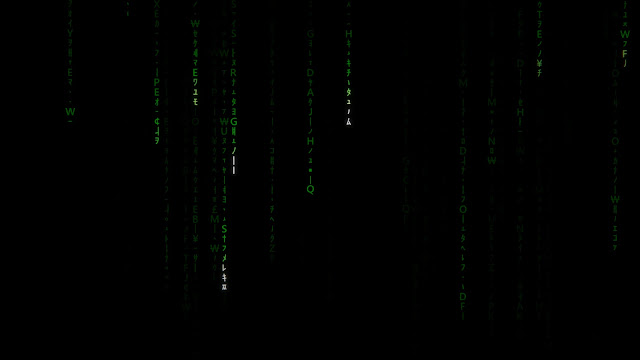
My Attempt at the Matrix Code Falling Effect

Image
Here is my take on the Falling Code effect in the style of The Matrix. I am 23 years late to the game. If you asked me a year before if I would be able to achieve this effect, I wouldn't believe I would be able to achieve this without looking up a tutorial, even when I was already using Houdini for a good number of years. But I can now say I am able to achieve a decent set-up with some way to control various aspects of the effect, all on my own :)

Alembic Cache Export and Import in May

Image
Alembic Cache Export and Import in Maya from Patrick Woo on Vimeo . Watch this on YouTube. Here's a new video I've created on my channel. This video shows how I export and import models and animation to the Alembic format (.abc). It also shows how imported Alembic files can have some flexibility in terms of offsetting animation timings, playback speed and cycling options .

My Tutorial Appeared in The Corridor Crew's Video

Image
One of my viewers informed me that a few seconds of my Maya Expressions part 06 - Noise video got to appear in one of their videos. I love videos from The Corridor Crew. They have excellent content that informs and entertains industry professionals and lay-people alike. It is an honour that they stumbled on my videos, and an honour to have my few seconds of fame on their show. :) If you are really interested, My tiny moment of fame happens 10 minutes 9 seconds into the show.

Houdini Pyro Colour Advection

Image
I've always wanted to do this! Advecting swirling colours in Houdini used to require quite a bit of preparation constructing the volumes, but not any more with the volumeRasterizeAttributes that can create volumes from mixed data types (float, vec3, etc).  This is a viewport flipbook, not rendered For some reason, I find myself watching the yellows and greens every time.

This Blog is Listed Top 60 VFX Websites to Follow in 2021

Image
One of my students who widely crawls the Internet ( Shivam Upadhyay , that's you!) pointed me to this website:  https://blog.feedspot.com/vfx_blogs/ Written on Oct 17 2021, this article lists my blog as 44th of the top 60 websites to follow in 2021.  I am super honoured to be listed together with the top personalities online such as Allan McKay, VFX Soldier, cmiVFX, Andrew Kramer of Video Copilot, etc. This pleasant surprise serves to motivate me and to keep my passion alive. Thank you for reading my articles and following this blog for the years I've been writing.  Here's to many more years of writing, learning and sharing! Update 07 Nov 2021: The volatility of the ranking shocked me. According to that same page, my blog is now ranked 29th on the same page! It is a pleasant surprise, and I am dead certain it has nothing to do with my popularity or publicity skills. The ranking exceeds pages of wildly popular names like The Gnomon Workshop, Video Copilot and Houdini Video...

Houdini Ocean Spectrum on Toy

Image
Houdini Ocean Spectrum on Toy from Patrick Woo on Vimeo . Watch this on YouTube too! Here's my latest test in Houdini. In this test, I manage to apply Houdini's Ocean Spectrum a non-planar shape. The ocean spectrum in Houdini allows the artist to define parameters that describe an open-ocean surface. With these settings, Houdini can generate a very natural-looking ocean surface without the expensive simulation time (this is much like how Houdini's Heightfield is implemented). Since this tool was meant for an open ocean surface, it mainly works with a flat grid by adding displacement to it. If we plug a non-planar object to evaluate this spectrum with the OceanEvaluate SOP, it results in a streaking projection downwards in the Y-axis. Also, the faces that face towards negative Y will get an inverted displacement pattern of that ocean spectrum. In this test, I derive a set-up that overcomes the planar nature of the projection and the negative pattern caused by the same pr...

Houdini Boxes Rolling Set-up

Image
  This is a Houdini implementation of my previous Maya Boxes Rolling Rig . In this set-up, I also switched in a Rubber Toy to see how it would look. The path of travel was created with a Solver SOP that advances the position with a noise animated over time. Another Solver SOP handles the rotation of the box/rubber-toy, and driven by the accumulated distance travelled.

Houdini Network Node Flags

Image
Video is also on YouTube here . In this video, I talk about a basic feature working with Houdini: flags in network nodes. These are the display, render, template and template-shaded and lock flags. I also show how I use them in two working situations. The most note-worthy flag is the lock flag. This helps to freeze the evaluation of upstream nodes for faster evaluation of nodes downstream. A special shout-out to Kin Hoeng from Voodoo Visual (https://voodoo-visual.com) who contributed to the asset in the later demonstration.

Rolling Boxes Set-up in Maya

Image
Maya Boxes Rolling Rig from Patrick Woo on Vimeo . Here's my latest crazy experiment in 3D! The principles and techniques behind this deceptively simple-looking rig took years to click together for me. This is more so from the perspective of optimisation and simplicity of the implemented solution in my mind. The paths of the boxes are pre-animated via a path constraint. But I make sure the boxes are pivoting with their corners planted on the ground, that they are not sliding.  Students who have attended my rigging classes will understand the tedious process of manually rigging a "rolling cube" by unfolding it from corner pivots. The main technique used here is very different. It treats the box more like a rolling wheel than a pivoting box. I may create a tutorial for this in the coming months.

Houdini Cubes Icosahedron Formation

Image
Watch this on YouTube  and Vimeo . Here's my latest test: directable and procedural cubes transiting from a shape to another in Houdini. It is mainly a VEX-driven set-up. This is part of a research effort to determine the viability of an idea for my student's project. Before I began I was wondering if I was able to achieve this at all. Even though it is not perfect in its present form, I am quite happy with the result and confident that I can help to guide the student in her efforts. #houdini​ #vex​ #motiondesign​ #procedural

Jooble.org - A Jobs Platform for VFX Artists

Image
I am excited to share a visual effects jobs platform that has been recommended to me! Check out Jooble.com ! Searching for jobs online is a trend that continues to grow. Large resources with an audience of millions, such as Jooble.org, are most effective in this case. They provide a huge database of offers and simplify the search through convenient tools, thereby connecting the job seeker and the employer. Jooble currently hosts job opportunities in 71 countries. This is especially relevant for freelancers seeking international connections and opportunities. Jooble’s key features Collecting jobs from resources all over the world. Thus, in one place collected offers from numerous online sites, including even regional and city websites, which significantly saves time on searching. Excellent usability in both desktop and mobile versions. There is no unnecessary information on the site that can be confusing. First of all, the owners monetize the platform from the traffic sent to the sites ...

When Darkness Stares Back Rock Eye

Image
This piece is based on the still image I created for my track "When Darkness Stares Back": soundcloud.com/patrickwoo/patrick-woo-when-darkness-stares-back  Here I used a video to displace vertices. In the finished version I also added further rock maps displacement, shader tweaks, tracked light sources, re-timing of footage and render, and further compositing processes to augment my renders.

Houdini Assembly Per Piece Animation for Reel Breakdown

Image
  Houdini Assembly Per-Piece Animation for Reel Breakdowns from Patrick Woo on Vimeo . This is my attempt at recreating the effect of pieces assembling themselves in a VFX reel breakdown. In the drop-down version. The points were sorted along the X-axis. Further, using an ExplodedView SOP, I can sort the pieces by the distance which each piece get exploded from the centre. With that sorting order, I am able to achieve the re-assembly style of "Centre Out", and "Outside In". The core is done mainly in a point wrangle node. As shown in the beginning, I have controls for start frame, interval (in frames) between each piece and animation duration for each dropping piece. There is also a ramp to control the speed of each piece as they approach their final position. Rifle asset is modelled by Matija Å vaco and downloaded from  sketchfab.com/3d-models/sci-fi-sniper-rifle-free-2d1bef3aa9ae47c5aee26cc3f032ab31

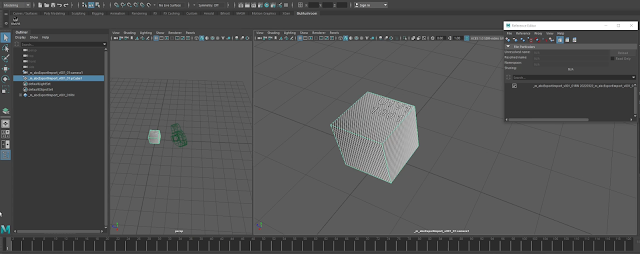
Maya Python tool: CopyPasteCurvePoints

Image
Here is a tool I wrote a while back. It grabs the points from a source curve and copies the position of those points to a new curve, or an existing target curve. The points receiving the pasted positions can be configured to start from any index on the target curve.

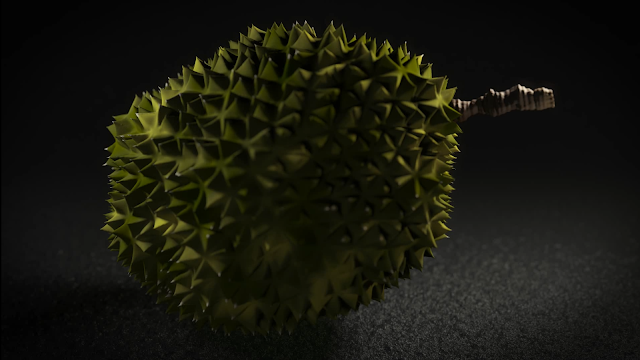
Durian Animation

Image
Houdini Procedural Durian Animation from Patrick Woo on Vimeo . Here is a rendered durian animation. The procedural model was originally static, built for my students' class assignment, I went to animate, light and render it. Rendered in Houdini Mantra.

Maya Expressions Part 07 - Sine and Cosine Functions

Click here for the Youtube version of this video  Happy new year to one and all! Continuing my video series of Maya Expressions, we step into sine and cosine function curves. After talking about random noise functions in the last 2 videos, we talk about the predictable and repeating sine and cosine functions.  These beautiful curves are derived from trigonometry rules relating to triangles and circles. With these functions, we open the door to a wide variety of use-cases where we can drive our objects and their attributes in animation. I will also show a few examples in the video.

Nuke's Colour Selection Scheme

Image
In these last months I've had the opportunity to become more involved in compositing in Nuke. This involves a lot of working with colours. One of the things that had me curious for while was the sliders on the right side of the standard nuke colour picker.  I am talking about the vertical sliders on the right of the image above.  After investing some time in reading the Nuke documentation, I came to the appropriate page  that indicates that this is the TMI colour scheme that allows the user to pick a colour by colour temperature.  Nuke also allows for a more comprehensive colour picker by ctrl/cmd-clicking on the colour wheel icon (to the left of the "4" icon on the right of the image above). Nuke calls it the alternative colour picker. Activating it this way will create a floating colour picker panel that you can interact with. In this panel, you can use the top buttons to toggle the visibility of the TMI, HSV and RGB colour schemes to work with whichever way that i...

Creating a Camera Frustum in Houdini

  Creating a Camera Frustum in Houdini  from  Patrick Woo  on  Vimeo . In this newest video tutorial, I show how to quickly create a camera frustum in Houdini. Having a polygon geometry that outlines the camera frustum is useful as a visual indicator of the camera's direction and shows immediately which objects are inside or outside of the camera. It also allows for a geometric image plane and opens up visualisation options for clipping planes and projection mapping operations.

Maya Expressions 06 - Noise Function

Go here if you'd rather view this on YouTube :) In Maya Expressions Part 05, I showed how to generate random values in expressions. But the values are discrete, not continuous, and cannot be used for most animation situations. In Maya Expressions Part 06 I explore creating animation driven by expression using the noise() function. If you enjoy the video, please like and subscribe. I hope you enjoy the video. I hope are well, stay safe.